All Trades.
One Thread.
From the people arriving on site to the materials moving through it and the work ready for sign-off. SiteThread connects access, punch listing, and inventory management in one coordinated jobsite workflow.
Access Control
Give the entry desk a clear view of who’s arriving, what’s on file, and what needs attention.
Punch Listing
Connect every trade to the right location, the next action, and the record of what happened.
Inventory Management
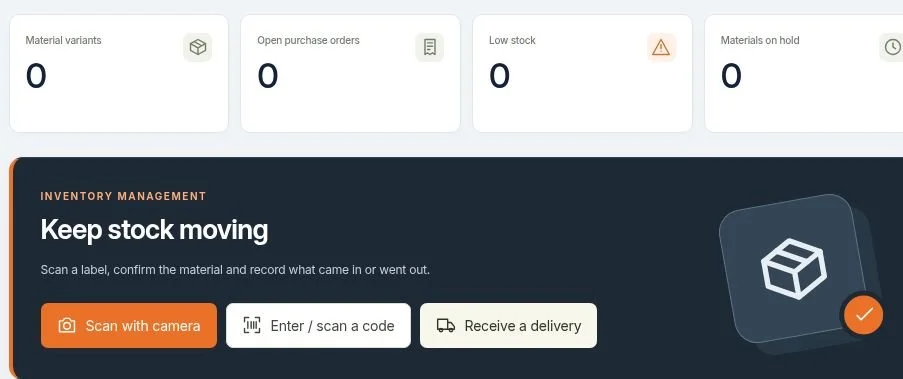
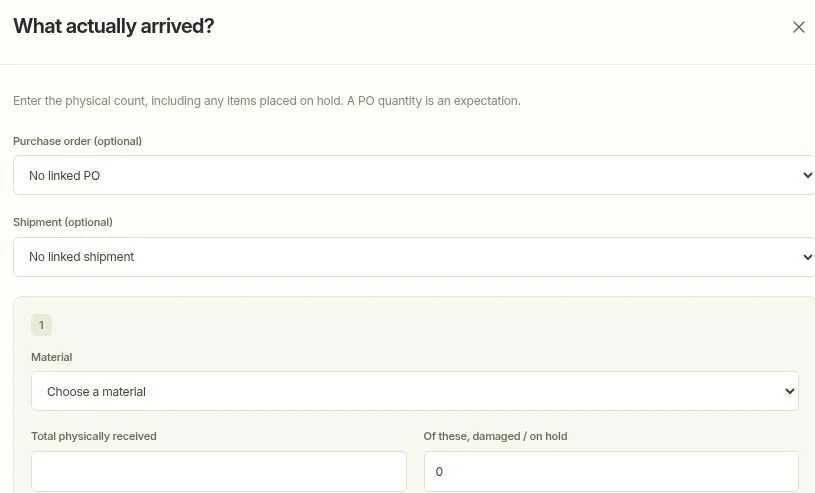
Know what arrived, where it went, who received it, and what needs to come back. Connect purchasing with the people moving materials on site.
Access and punch previews use fictional data. Inventory images are cropped screenshots of the actual app, with private details excluded. Workspace access requires an account.
A better first step
onto the jobsite.
A barcode is just the starting point. SiteThread Access Control brings a worker’s photo, access level, certifications, and supporting records into one easy-to-read view at the entry desk.
Scan. Recognize. Review.
Use a badge, USB scanner, or supported camera scanning workflow to bring up the right profile. Compare the displayed photo and review access status, credentials, and project requirements.
Know what’s current.
Organize named certifications with start and expiration dates. The status view highlights approaching expirations and explains items that need attention.
See the reason, not just a color.
Clear green, yellow, and red indicators help the desk identify issues quickly, with the underlying records one step away.
Keep people connected across projects.
A shared cloud-based worker directory reduces repeat setup and keeps project-specific access and requirements in context.
Ask your project records.
Use a connected MCP client to ask, “Summarize the manually recorded attendance for this project this week.” Bring recorded workforce context into the conversation without confusing a badge scan with attendance.
Every trade.
Every detail.
A clear next step.
Keep inspections, deficiencies, and follow-through connected to the actual places where work happens. SiteThread’s field workspace is designed around how construction teams coordinate, not another disconnected spreadsheet.
From first inspection to final closeoutStart with the right location.
Organize work by project, building, floor, apartment, room, or common area. Give every item a useful home instead of losing it in a long generic list.
Make the issue unmistakable.
Bring descriptions, photos, and retained inspections together in a Quality Assurance workspace so the next person understands the condition and the action needed.
Connect the responsible trade.
Coordinate assignments and follow-up across the project team and subcontractors, with a shared view of what is open and what is ready to verify.
Close the loop with a record.
Build a traceable path from the first observation to review and closeout. Keep the context of each item with the work, not scattered across messages.
Ask what needs attention.
Use a connected MCP client to ask, “Show open punch items on Level 4, grouped by trade.” Turn project records into a focused follow-up list without hunting through separate screens.
Put it on the record.
Document the condition and its location.
Give it an owner.
Connect the next action to the right trade.
Verify the correction.
Bring completed work back for inspection.
Keep the history.
Preserve the result and the project context.
Received is only
the beginning.
Distribution matters.
A delivery is not finished when it reaches the gate. SiteThread connects purchasing departments, project managers, superintendents, and field teams around what was ordered, what actually arrived, and where every recorded material movement leads.
Give the office visibility into the jobsite and give the jobsite the purchasing context it needs. Replace disconnected spreadsheets, delivery slips, and “who took it?” conversations with an organized flow from purchase order to receipt, distribution, and return.
Office to field · Delivery to destinationStart with the PO.
Upload purchase-order PDFs or photos for draft extraction, import a structured spreadsheet, or enter items directly. Review the extracted details before confirming them so purchasing information becomes a useful starting point, not an unchecked stock count.
Record what actually arrives.
Confirm receipts against the order and keep delivered quantities distinct from ordered quantities. Partial deliveries, shortages, and damaged goods stay visible in the receiving record instead of disappearing into an assumption that everything arrived.
Follow the handoff.
Track materials as they leave storage and move to the people doing the work. Capture the recipient’s name, company, and signature on outgoing handoffs, creating a clear record of who received the material.
A history behind the balance.
Connect receipts, distributions, and returns in movement history. See what is available and trace the recorded activity behind it, helping teams investigate discrepancies before they become another emergency reorder.
Close the materials loop.
Keep returns and damaged materials in the same operational conversation as purchasing and distribution. Document the condition and movement so office and field teams can coordinate the next step with shared context.
Less chasing. Better visibility.
Bring purchasing, receiving, and field distribution together with role-based workflows and scannable labels. Clear records help reduce misplaced deliveries, duplicate purchases, and uncertainty about where materials went.
Ask where the material went.
Use a connected MCP client to ask, “Show current inventory and recent material movements for this project.” Review recorded receipts, distributions, and returns in one conversation, using the synchronized records you are authorized to access.
From delivery to distribution, keep every material accounted for.
Confirm deliveries and record what actually arrives.
Follow stock levels, locations, and recorded movements.
Coordinate inspections, returns, and damaged items.
Record the recipient, company, and signed handoff.
Built around the real handoff.
Actual SiteThread interface, shown without private project or account details.
Your project.
Your questions.
One conversation.
SiteThread’s built-in Model Context Protocol connection brings your authorized project information into compatible AI clients, including ChatGPT and Claude. Connect your account, choose the project, and ask for the context you need in everyday language.
Move between workforce records, punch-list progress, and material activity without rebuilding the story in every tool. Ask a question, narrow the scope, and follow up using the same connected project context.
Connected answers · Your existing permissions“Summarize this week’s manually recorded attendance for the project, by day.”
Understand the attendance entries your team recorded. Badge scans are clearance checks, not attendance records.“Which punch items are still open on Level 4, and which trades need to follow up?”
Find outstanding work with its location, status, and project context.“Show current inventory and recent material movements. What was received, distributed, or returned?”
Bring synchronized material records into a concise, practical review.Connect once. Ask naturally.
Use a compatible MCP-enabled client and authorize your SiteThread account. Availability depends on the client’s connection support and configuration.
Scoped to your access.
Answers use the organizations and projects your signed-in account is permitted to read, not an unrestricted copy of everyone’s data.
Insight, not silent changes.
The MCP connection is read-only. It retrieves and summarizes records; changes stay in SiteThread. Pending offline activity appears after it synchronizes.
Bring your next project
into the thread.
SiteThread Access Control supports staffed entry review and on-screen status decisions. Physical door operation and final site-access decisions remain with the authorized site team. Contact DPG Technology to discuss your project and available service options.